How to Cancel a Planet Fitness Membership Online (2026)
You can cancel a Planet Fitness membership online through the member portal on planetfitness.com. You can also visit your home club or mail written notice to it. To stop your next payment, the club must receive your request at least 8 days before your billing date. Rules can vary by club and state, so save proof of whichever route you use.
Guide updated October 2026 · Always confirm the current process in your membership agreement.
Planet Fitness Cancellation At a Glance
Planet Fitness lists three ways to end a membership in its official FAQ. Pick the one that fits where you live.
| Route | Where to start | Best for | Proof to keep |
|---|---|---|---|
| Member portal | Log in at planetfitness.com | Members who see a cancel option | Confirmation page or email |
| Home club visit | Front desk at your home club | Members who live nearby | Signed form or written confirmation |
| Written notice by mail | Your home club’s address | Members who moved away | Copy of the letter and a delivery record |
Live near your club? Visit it. Moved away? Use the portal or mail written notice.
| Item | What to know |
|---|---|
| Monthly billing | The club must receive your request at least 8 days before your next billing date |
| Annual fee | The same 8 day rule applies |
| Processing time | Billing changes can take up to 7 days |
| Buyout fee | $58 if you end a minimum term membership early |
| No Commitment plans | No buyout fee |
| Annual fee amount | Varies by club. Many clubs list $49 |
How Do You Cancel A Planet Fitness Membership Online?
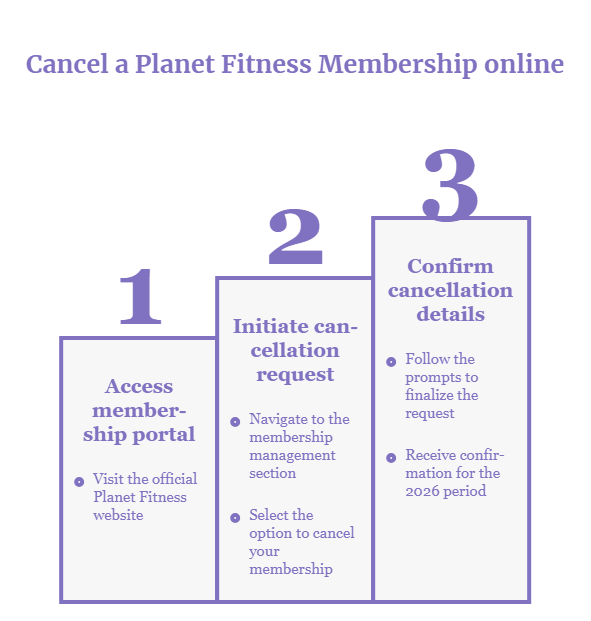
Log in to your member portal on planetfitness.com. Open your membership page and look for the cancel option. Follow the prompts and save the confirmation. Planet Fitness says procedures vary by location, so not every account shows the option.
Steps in the Member Portal
Use a web browser, not the app.
- Find your next billing date and annual fee date in your account. Count back 8 days.
- Go to planetfitness.com and select My Account.
- Sign in with the email and password on your membership.
- Open your membership page. [VERIFY IN PORTAL: menu name]
- Select the cancel option. [VERIFY IN PORTAL: button label]
- Answer any prompts and confirm your request.
- Take a screenshot of the confirmation page. Save the confirmation email too.
What if You Do Not See a Cancel Option?
Planet Fitness says procedures vary by location. If the option is missing, your club may handle cancellations itself. Switch to a club visit or mailed notice the same day. Waiting can push you past the 8 day cutoff.
What does a Confirmed Cancellation Look Like?
Look for a confirmation page and a confirmation email. Save both. Log in a few days later and check your account status. If no email arrives, ask your home club for written confirmation.
Can you Cancel in the PF App?
The official FAQ names the member portal on the website. It does not name the app. The app shows billing details and workouts. Deleting it does not cancel anything.
Is Planet Fitness easier to cancel now?
Yes, in one way. The official FAQ now lists the online member portal next to a club visit and mailed notice. Many club offer pages also show Cancel Online, Anytime on No Commitment plans. Examples include clubs in Plantation, Florida and Crystal, Minnesota.
Earlier reports said members had to visit the club or send a letter. The Bear Cave described that policy in 2023. Not every member sees an online option today. Details vary by club.
What is the Planet Fitness Cancellation Deadline?
The club must receive your request at least 8 days before your next billing date. The same rule applies to the annual fee. Planet Fitness says billing changes can take up to 7 days.
Based on the official Planet Fitness FAQ, checked October 9, 2026. Your membership agreement may state a different deadline. This tool is not affiliated with Planet Fitness.
Monthly billing example
Say your next draft is November 17. Count back 8 days. Your request must reach the club by November 9. If you mail it, send it days earlier. A letter mailed on November 9 arrives too late.
Annual fee example
Say your annual fee bills on or shortly after December 1. Count back 8 days. Your request must reach the club by November 23. Your agreement and your club’s offer page list your annual fee date. Read more in our guide to the Planet Fitness annual fee.
Why some sites say the 10th and the 25th
Several guides say to cancel by the 10th for monthly billing. They say the 25th of the previous month for the annual fee. The official FAQ we checked says 8 days before the billing date instead. For a 17th billing date, 8 days back is the 9th. We could not find where the 10th and 25th come from. Use the earlier date. Check your agreement for its own deadline.
How Do You Cancel Planet Fitness By Mail or in Person?
Mail written notice to your home club, or visit it during staffed hours. Either way, the club must receive your request before the 8 day cutoff. Keep proof of what you did and when.
By Mail
- Find your home club’s address with the club finder on planetfitness.com.
- Write a short letter. Include your full name, address, phone, email and member ID or PF Club Pass number.
- State that you want to end your membership. Ask for written confirmation of the end date.
- Sign and date the letter.
- Mail it early. Use a service with tracking if you want delivery proof.
- Keep a copy of the letter and the tracking record.
Planet Fitness asks for written notification by mail. It does not say certified mail is required. Tracking still gives you proof. Need a ready letter? Use our Planet Fitness cancellation letter template.
In Person
Go during staffed hours. Bring photo ID and your PF Club Pass or member ID. Ask for the cancellation form. Before you leave, ask for these four things:
- Your final billing date
- Your annual fee date
- Any buyout amount you owe
- A written or emailed copy of your request
Can You Cancel Planet Fitness By Phone or Email?
The official FAQ lists neither as a standard route. Call your home club for billing questions. Then use the portal, a visit or mailed notice for the actual request. An email to a random address does not replace those routes unless your club tells you otherwise.
Does Planet Fitness Charge a Cancellation Fee?
Only if your membership has a minimum term and you end it early. Planet Fitness lists a $58 buyout fee in that case. A No Commitment membership has no buyout fee.
Your commitment is the minimum number of months you will be billed. Your agreement shows yours. See our guide to the Planet Fitness cancellation fee for more detail.
The annual fee is separate
Prices vary by club. Pages we checked show $49 in Florida, Minnesota and North Carolina. Several New York City offers show $59. A Philadelphia club calls it a Rate Guarantee Fee. Monthly dues vary too. The homepage lists Classic from $15 and PF Black Card from $24.99.
What if you cannot pay the fee?
Read your agreement and confirm it has a minimum term. Ask your home club for the exact amount and due date in writing. We found no hardship waiver on Planet Fitness’s public pages. Ask anyway, but do not count on one.
What if your Situation is Different?
Most members use the same three routes. These cases need a little more care.
You moved away
You do not need to return to the club. Use the member portal or mail written notice to your home club. The club finder shows its address.
You do not know your home club or member ID
Your membership agreement should name your home club. Your member portal holds your account details too. If you cannot log in, use the Contact Us form on planetfitness.com. Member Services is open Monday to Friday, 9 am to 6 pm ET.
You are under 18
A parent or guardian signs the agreement for members ages 13 to 17. Ask that adult to help with the request. Policies vary by club, so ask your home club which signature it needs. If you also moved, you can still use mail or the portal.
You have a cosigner, a subsidized plan or Paid in Full billing
The official FAQ mentions these only for online transfers. For cancellation, ask your home club what applies to your agreement.
Classic or PF Black Card
Both plans use the same three routes. Your fees and commitment depend on your agreement, not the plan name. See our guide to PF Black Card cancellation.
Should you pause, Downgrade or Transfer instead?
Maybe A transfer works online if you meet the rules. A downgrade happens at the club. Planet Fitness publishes no universal freeze policy.
Transfer to another club
Planet Fitness lets you transfer online if all of these are true:
- You are not a minor.
- You have been a member for at least 90 days.
- You have not transferred in the past 90 days.
- You owe no dues, and you have no cosigner or third party subsidized plan.
- You pay monthly. Paid in Full memberships do not qualify.
If you do not qualify, contact your home club.
Downgrade from PF Black Card
Stop by your club and ask a team member. The FAQ says downgrades happen there.
Pause or freeze
We found no public freeze rule. Ask your home club whether your membership qualifies and what it costs. Our guide to pausing a Planet Fitness membership covers questions to ask.
Is it legal for a gym to require a letter or a visit?
It depends on your state and your contract. This is not legal advice. Federal rules changed in 2025 and 2026, and some states have their own laws.
The FTC adopted a click to cancel rule in 2024. A federal appeals court vacated it on July 8, 2025. The FTC then restarted the rulemaking on March 11, 2026. A May 2026 legal analysis said the 2024 rule was not in effect. Check for updates before you rely on this.
California is one state example. Its automatic renewal law says a business that lets you accept an offer online must let you end it online. The AB 2863 bill text sets that rule. The amendment took effect July 1, 2025. Whether it covers your Planet Fitness agreement depends on the details.
If you think a gym blocked your cancellation, you can report it. The steps are in the next sections.
How do You stop Automatic Payments at Planet Fitness?
Cancel the membership first. That is what stops future drafts. A stop payment order at your bank can block one draft, but it does not end the membership.
Many Planet Fitness clubs take payment from a checking account only. The company says this keeps your membership running if a card is lost or expires. So canceling a debit card may not stop a draft.
The Consumer Financial Protection Bureau says you can give your bank a stop payment order. Do it at least three business days before the payment is scheduled. Your bank may ask for the order in writing. Treat the bank step as a backup, not a substitute for canceling.
What Should you do After You Cancel?
Save proof, check your account and watch your bank statement for the next one or two billing cycles.
Keep your proof
- The confirmation page or email
- A copy of your letter and the tracking record
- Your signed form from the club
- The date the club received your request
Check your account
Log in a few days later. Look at your membership status. If it still shows active, contact your home club.
Watch your statement
Look for charges labeled Planet Fitness or Planet Fit. A final charge can be legitimate if your request arrived inside the 8 day window. Compare the dates before you dispute it.
What if Planet Fitness Charges You After You Cancel?
Compare your dates first. Then contact your home club with proof. Escalate step by step if the charge stays.
- Check three dates: when the club received your request, your billing date and your annual fee date.
- Contact your home club with your proof. Ask for a billing review and a written reply.
- If the club is closed or silent, send your proof through the Contact Us form for Member Services.
- Call your bank. Ask about disputing the charge and stopping the next draft.
- File a report at reportfraud.ftc.gov and contact your state attorney general’s office. You can also file a complaint with the Better Business Bureau.