
How to Transfer your Planet Fitness Membership (2026)
Are you facing this issue to transfer Planet Fitness membership to another club. You cannot transfer it to another person membership. Planet Fitness lets eligible members switch home clubs online or at the club. Its policy says a transfer fee may apply, so ask the new club about price and billing before you confirm.
| Question | Short answer |
|---|---|
| Move to another club? | Yes, online or at a club |
| Give it to another person? | No |
| Online transfer, age | You must not be a minor |
| Time as a member | At least 90 days |
| Since your last transfer | At least 90 days |
| Balance and extras | You owe nothing and have no cosigner or third party subsidy |
| Billing type | Monthly. Paid in Full does not qualify online |
| Fee | A transfer fee may apply. No amount is published |
| Other countries | No. Transfers stay in the same country |
Can you transfer Planet Fitness membership?
Yes, to another club. The official FAQ says you can transfer online if five things are true. Contact your home club if they are not.
Who qualifies for an online transfer
- You are not a minor.
- You have been a member for at least 90 days.
- You have not transferred in the past 90 days.
- You owe no dues or fees at your current club, and you have no financial cosigner or third party subsidized plan.
- You pay monthly. Paid in Full memberships do not qualify.
What the policy page adds
The club policies list a few more rules. Your membership must be at least three months old and in good standing. The transfer must stay in the same country. Prepay memberships are non transferable. Monthly memberships cannot move from one person to another. A transfer fee may apply. Planet Fitness also says the move happens without prejudice or loss of current membership benefits.
The official FAQ does not list an active freeze as a blocker, though one AI summary says it does. Ask your club if you are frozen.
How do you transfer a Planet Fitness membership online?
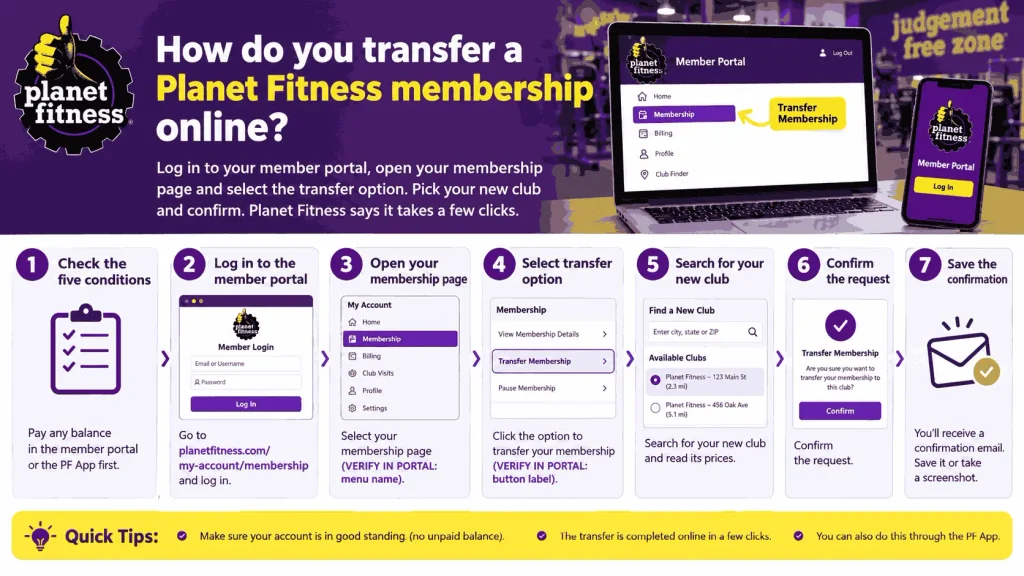
Log in to your member portal, open your membership page and select the transfer option. Pick your new club and confirm. Planet Fitness says it takes a few clicks.
- Check the five conditions above. Pay any balance in the member portal or the PF App first.
- Log in to the member portal at planetfitness.com.
- Open your membership page. [VERIFY IN PORTAL: menu name]
- Select the option to transfer your membership. [VERIFY IN PORTAL: button label]
- Search for your new club and read its prices.
- Confirm the request.
- Save the confirmation email or a screenshot.
What if you do not see the option?
You may not meet one of the five conditions. Check your balance, your join date and your billing type. If you still qualify, contact your home club for a manual transfer. If the club is closed, use the Contact Us form for Member Services. It is open Monday to Friday, 9 am to 6 pm ET.
Can you transfer a Planet Fitness membership in person?
Yes. Visit your current club or the new one and ask for a home club transfer. Bring your member number or Club Pass and a photo ID.
- Ask whether you meet the conditions.
- Ask for the transfer fee, if any.
- Ask what your monthly rate will be.
- Ask for written or emailed confirmation before you leave.
This route also works when the online option is missing.
Can you transfer your Planet Fitness membership if you move?
Yes, within the same country. Planet Fitness lets you move your home club to a club near your new address, even in another state. Use the club finder to check clubs near the new address.
- Moving to another US state. Transfer, but check the new club’s prices first.
- No club near your new home. Cancel instead. See our guide to cancel a Planet Fitness membership online.
- Moving to another country. Transfers must stay in the same country, so cancel and join a new club there.
- Black Card members. You can use any club, so you may not need to transfer at all.
Planet Fitness Australia is run by a separate franchisee. Its FAQ says transfers happen by phone or in the club, and cancelling needs 7 days notice. Canada has its own site at planetfitness.ca. Rules differ by country.
What does it cost to transfer a Planet Fitness membership?
Planet Fitness’s policy says a transfer fee may apply and lists no amount. Both big competitor guides say transfers are free. They cite no Planet Fitness source. Ask your new club for the exact fee in writing.
Price at the new club matters more. The same plan costs different amounts at different clubs. On October 17, 2026, club pages showed these Classic prices:
| Club | Classic monthly price |
|---|---|
| Washington (Gallery Place), DC | $15 |
| Wichita Falls, TX | $15 on a 12 month term, $20 with No Commitment |
| Brooklyn (East New York), NY | $19 on a 12 month term, $24 with No Commitment |
Planet Fitness’s policy does not say whether your monthly rate stays after a transfer. Its CEO said on the second quarter 2026 call that members keep the rate they joined at while they stay members. Get your rate confirmed in writing.
Five questions to ask the new club
- What is the transfer fee, if any?
- What will my monthly rate be after the transfer?
- When is my annual fee, and what will it cost?
- Does my billing date or minimum term change?
- Can you confirm all of this in writing?
Guides disagree on whether the annual fee date resets. Planet Fitness’s pages do not say. Our annual fee guide shows how to find your date.
Can you transfer a Planet Fitness membership to another person?
No. The policy says monthly memberships are non transferable from one individual to another. That covers a husband, wife, friend or child. Each member needs their own membership and Club Pass.
Here is what you can do instead.
- Cancel yours and have them join. Use the cancellation routes and the cutoff in our cancellation guide.
- Use Refer a Friend. Planet Fitness says each friend who joins through your link earns you a free month, up to 3 a year. Your friend gets a $1 down deal. Credits apply to monthly fees, not the annual fee or past due balances, per the referral terms. Prepaid members do not qualify.
- Upgrade to Black Card. You can bring one guest per visit.
Can two people share a PF Black Card?
No. A Black Card belongs to one member. The member can bring one guest each visit. The guest must be 18 or older, or 13 to 17 with a parent or guardian. Guests cannot use Black Card perks. Send the invite in the PF App, and your guest gets a digital Club Pass.
How many times can you transfer your Planet Fitness membership?
Once every 90 days. The official FAQ says you must not have transferred in the past 90 days. We found no lifetime limit.
Can you transfer a Paid in Full, cosigned or subsidized membership?
Not online. The official FAQ excludes them, and the policy calls prepay memberships non transferable. Contact your home club to ask what it can do. You may have to cancel and rejoin at the new club.
Cancelling and rejoining can bring a new startup fee and a new annual fee, based on club pages we checked. It can also end a protected rate. Compare the costs first. See our membership cost guide.
Should you transfer, cancel or pause?
Transfer if you will use a new club. Cancel if you will not. Pause only if your club allows it.
| Your situation | Better choice | Why |
|---|---|---|
| Moving within the country | Transfer | Keeps your membership active |
| Moving abroad | Cancel | Transfers stay in one country |
| New club costs less | Transfer | Ask for the rate in writing |
| Not using the gym | Cancel on time | Avoids more dues and the annual fee |
| Injury or illness | Ask about a pause | See our pause guide |
| Paid in Full or cosigner | Ask your club | Online transfer is not available |
Does Planet Fitness ever waive the annual fee?
Some offers do. Club pages we checked in Brooklyn and Sanford, FL list a Black Card offer with no annual fee. Most offers list $49 or $59. A waived fee does not always mean a lower total cost. See our annual fee guide.
Will Planet Fitness charge an annual fee if you cancel?
Only if the fee bills before your cancellation takes effect. The cutoff wording in Planet Fitness’s FAQ has changed in our checks. One version says the club must receive your request by the 25th of the month before the annual fee date. Others said 7 to 8 days before. Use the earliest date and confirm it with your club.
Is Planet Fitness difficult to cancel?
Not if you start early. Planet Fitness lists three ways: the member portal, a club visit or written notice by mail. The hard part is the cutoff date. Our cancellation guide explains each route.
More Planet Fitness questions people ask
Can I pay for 1 year of Planet Fitness?
Some clubs offer a Paid in Full membership, so ask yours. It cannot transfer online, and it does not qualify for Refer a Friend credits. See our annual fee guide.
Am I allowed to go to Planet Fitness twice in one day?
Planet Fitness publishes no daily visit limit for the gym floor. Our beginner workout plan has details.
What is the 10/5 rule in Planet Fitness?
It is a staff greeting standard, not a member rule. See our holiday hours guide for the full answer.
Will my billing date change after a transfer?
Planet Fitness’s pages do not say. One guide says it stays the same, and another says it may change. Ask the new club and get the answer in writing.
Can a minor transfer a membership?
Not online. The official FAQ requires you to be an adult for online transfer. A parent or guardian should contact the home club.
Do I need to cancel at my old club?
No. A transfer moves your membership. Cancelling ends it. Do one or the other, and ask the club to confirm that your old club will stop billing.
Can I transfer if my account is frozen?
The official list does not mention freezes. One AI summary says an active freeze blocks transfers. Ask your home club before you try.